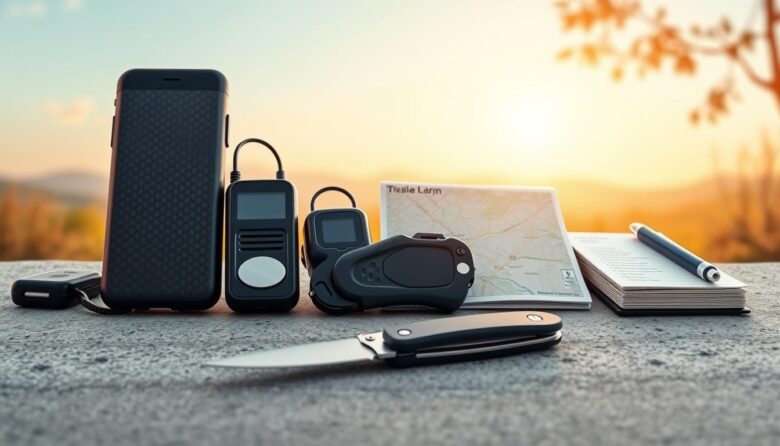
Many popular campus apps—like Noonlight, Rave Guardian, and LiveSafe—deliver great features but rely on a network or GPS. When a phone loses signal, those conveniences can disappear.
This guide argues for an offline-first approach that boosts resilience. We focus on physical items and simple routines that still work during outages, dead zones, or device loss.
You will learn how to pick devices with tactile activation, loud alerts, long battery life, and rugged build. We also cover analog check-ins and portable ways to keep key data and ID accessible without a live network.
Practical protection fits daily life—on campus, transit, or while traveling in the United States. The goal is layered security that complements any app you already use.
Read on for clear recommendations, checklist-style habits, and purchase priorities that help users face common threats with reliable options they can trust today.
Why offline matters today for personal safety in the United States
Network congestion, storms, and rural gaps often cut off apps when users need them most. Campus apps like Rave Guardian, LiveSafe, and Noonlight offer helpful features, but many rely on GPS or an active internet connection for full function. When data or voice fails, those conveniences can disappear.
When connectivity fails: power outages, dead zones, and crowded events
Power outages and over-capacity networks at concerts or protests can interrupt service. Rural dead zones also leave people without cell coverage. In those moments, an app’s check-in or tracking feature may not work.
Campus blue light phones and other fixed lines act as offline anchors. They provide direct contact to campus security even when personal phones don’t. Pre-staged kits and practiced responses reduce reliance on fragile systems.
Balancing digital security with real-world protection
Apps are valuable as supplements, offering GPS share and timed alerts. But physical devices, repeatable routines, and local knowledge form the primary layer of protection.
Map your routes and note nearby offline resources. Keep essential information accessible without a network, and choose gear that fits your daily environment. This blend helps users face varied threats with consistent protection today.
Essential offline safety tools
Practical gear and clear staging give you fast options when digital help isn’t available. Choose items that are simple to use, easy to reach, and tested in real conditions.
Quick‑glance list: on‑body, at‑home, in‑transit, information protection
On‑body: compact alarms (120–140 dB), whistles (pea and pealess), legal-size pepper spray or gel, and discreet wearables with tactile activation for immediate alerting.
At‑home and dorm: door‑stop alarms, portable locks for different swing types, window wedges, and battery motion sensors with standalone sirens that do not need a hub.
In‑transit: reflective gear, marked route cards and paper maps, plus multi‑tools with seatbelt cutters and glass breakers for quick egress.
Information protection: hardware‑encrypted USB drives, PIN‑protected sticks, and physical copies of IDs stored in a small fire‑resistant pouch so you can access critical data without cloud access.
Stage items for fast control: front pockets for alarms, exterior bag loops for sprays, and bedside locations for home devices. Pick features that match noisy urban areas or long travel runs, and favor reliable, easy-to-operate designs users can deploy under stress.
On‑body personal safety devices that work without internet
Carry-on personal defense starts with simple, reachable devices you can deploy instantly. Place items where your dominant hand can reach them and practice draws so you act without fumbling.
Personal alarms and whistles for instant, loud alerts
Personal alarms produce loud sirens and, in some models, bright strobes. Pick designs with pull‑tabs or large buttons for quick, controlled activation under stress.
Whistles are maintenance‑free. Choose pealess models for reliability in wet or cold conditions, or pea whistles if you prefer a classic tone.
Pepper spray and gel: carry options, legal notes, and training
Sprays and gels give active defense. Gels cut down on blowback in wind; sprays cover a wider arc. Know campus rules and state law, and train with inert practice canisters.
Use keychain clips, pocket holsters, or quick‑release rings so you maintain fast access and control when confronted with threats.
Discreet wearables with tactile activation
Rings, belt clips, and keychain wearables offer silent or subtle activation without screens. These devices let you escalate quietly or trigger an alert when drawing attention would be risky.
Check features like siren volume, activation method, battery type, and durability. Test alerts at home so roommates recognize the tone and you reduce accidental activations.
Home and dorm room protection without a network
When your phone can’t connect, properly placed hardware and routines maintain control at entry points. Start by treating the room as a simple, layered system: visible deterrents, immediate alerts, and clear human response steps.
Door‑stop alarms, portable locks, and window wedges
Door‑stop alarms and portable locks add instant control at doors without wiring or Wi‑Fi. These devices trigger loud alerts on forced entry and are easy to remove for landlords or dorm rules.
Window wedges and secondary locks raise the cost of entry and, when paired with visible devices, increase perceived risk for intruders.
Battery‑powered motion sensors and standalone sirens
Battery motion detectors tied to standalone sirens give local detection and alerts without subscriptions or services. Place sensors near likely entry paths and test placement to cut false alarms.
Choose units with tamper‑resistant housings and loud output so detection leads to prompt occupant response or campus contact.
Flashlights and headlamps for low‑light defense and signaling
Keep high‑lumen flashlights and headlamps by doors and beds to disorient intruders and to signal for help. Store spare batteries in labeled containers for easy replacement and reliable storage.
Standardize a nightly routine: lock checks, device tests, and staging of your items. Document simple protocols for roommates, including who calls campus services and who activates alarms, so everyone acts quickly and with less confusion.
Travel and commuting safety tools to keep you protected offline
A short kit of mapped cards and rugged gear helps you navigate and exit trouble when connectivity drops. Prepare printed maps and pre-marked route cards so you keep access to directions if a phone battery dies or an app fails.
Analog navigation backups: paper maps and marked route cards
Carry a folded map, a printed list of addresses, and a small card with emergency contacts and preferred hospitals. Store one copy in your wallet and one in your bag for quick access.
Multi-tools and seatbelt cutters with glass breakers
Keep a compact multi‑tool near the driver’s seat that includes a seatbelt cutter and glass breaker. Stage the device in a belt sheath or visor clip so you can deploy it fast without fumbling.
Also carry a whistle and a minimalist flashlight on an outer pocket to speed alerts and help with low‑light detection. Pick items with grippy textures and clear activation features for reliable control under stress.
After any close call, review placement, update your route cards, and check blades and tips for wear so your kit stays ready for routine commutes or longer trips.
Information protection without internet: simple security that works anywhere
Secure, stand-alone storage gives you reliable access to IDs, medical notes, and route plans without a network.
Hardware encryption drives and PIN‑protected USBs protect sensitive data on the go. Choose devices with built‑in PIN pads or FIPS-level chips so unlocking does not depend on software or the cloud.
Keep one encrypted drive for daily carry and a second, securely stored backup at home. Use unique passcodes for each device so a single compromise does not expose all records.
Local backups and simple file organization matter more than complexity in a crisis. Use clear file names and compact folders so you can retrieve information fast without special apps.
Adopt basic management routines: test drives monthly, rotate devices, and document passcode recovery in a sealed envelope kept separately. Protect media with shock‑resistant cases and avoid leaving drives in hot cars.
Finally, keep printed copies of emergency contacts and IDs in a water‑resistant pouch and store at least one backup set offsite. These steps make your offline backup systems practical and resilient when networks fail.
Authentication and access control tools that don’t rely on a network
Hardware keys and local vaults give users a fallback when cloud recovery is slow or unavailable. These methods strengthen authentication and cut common vulnerabilities like phishing and SIM swap attacks.
Hardware security keys and local password vaults
Use hardware security keys to add phishing-resistant second factors. Keep a backup key in a secure place so you retain credential access if one is lost.
Choose a password manager that supports local encrypted vaults and emergency access without a constant internet link. TOTP authenticators generate one-time codes on-device, letting you sign in when the network is unavailable.
Adopt layered access: separate critical accounts from low-risk logins and store printed recovery codes in a sealed file. Audit reused passwords, enable device lockouts, and keep a clear inventory of accounts, MFA status, and where backups live.
Practice unlocking flows periodically. Store one key on daily carry and a spare at home to balance convenience with reliable control of your accounts and information.
Campus‑tested offline resources students can use right now
Campus programs and physical infrastructure give students immediate options when phones or apps are unavailable.
Blue light emergency phones connect directly to campus security without relying on your personal smartphone. Locate them on the campus map and memorize routes where they cluster for quick, direct access after dark.
Security escort services and safe‑ride programs
Many universities offer security escort services and safe‑ride programs that provide door‑to‑door support. Coordinate with friends or teams so someone always knows your plan.
Check escort hours during orientation and save campus service numbers as printed cards in your wallet.
Self‑defense classes and campus workshops
Enroll in self‑defense and awareness workshops to gain practical skills. Training makes on‑body alarms and personal items more effective by teaching confident responses.
Supplement digital options with mapped offline steps: use free campus apps like Rave Guardian or LiveSafe when you can, but back up timed check‑ins and route sharing with printed cards and a buddy system. These combined measures give users dependable access to help and keep campus security teams coordinated when connectivity drops.
Detection and monitoring without the web: staying aware in real time
Real-time awareness can come from compact gear and agreed check-ins, not just from an app or service.
Personal UV/flashlight counterfeit detectors for IDs and money
Carry a compact UV device to improve rapid detection of fake IDs and currency during travel or campus events.
Choose lights with multiple features—strobe modes, brightness levels, and battery indicators—for verification and basic signaling.
Use the light to check security threads, watermarks, and holograms quickly. That creates a reliable first check when an app cannot verify documents.
Analog check‑in cards and time‑boxed route plans for friends and teams
Write simple check‑in cards with departure time, route, and a return window so contacts can perform basic monitoring without data.
Agree a no-network protocol: wait the designated time, try a call, and then issue local campus or police alerts if no response. Use a prearranged code word for urgent escalation.
Keep a pen clipped to the card, practice the routine with your group, and combine route visibility choices—well-lit paths and populated corridors—to reduce threats.
After each trip, run a short analysis: was the time box realistic, did alerts trigger properly, and did contacts follow escalation steps? Small reviews make monitoring more reliable over time.
Cost and value: building a budget‑friendly offline safety kit
Smart prioritization turns a few inexpensive items into broad coverage for common campus and travel risks. Treat purchases like a small business decision: pick items that deliver the most protection per dollar.
What to prioritize first for maximum protection per dollar
Start with high‑impact, low‑cost picks: a loud personal alarm, quality whistle, reliable flashlight, and a door‑stop alarm. These offer strong, immediate value without recurring fees.
Add a pepper gel or spray where legal, plus a discreet wearable activation device. Compare options by durability, battery costs, and warranty rather than novelty features.
Many campus apps are free (Rave Guardian, LiveSafe). Paid monitoring like Noonlight runs about $4.99/month, so weigh subscriptions against physical items that require no ongoing services.
Treat your plan like business management: buy core items first, then expand. Choose a budget PIN‑protected USB and a cheap encrypted drive for redundancy. Track purchases and refresh cycles so your data and gear remain reliable for users and businesses alike.
Setup and management: how to stage, store, and practice with your tools
Set clear places for your gear and rehearse use often so responses feel automatic when minutes matter.
Stage items near likely exit points: alarms and sprays by doors, flashlights by beds, and portable locks at entryways. This cuts deployment time and makes retrieval predictable for every user.
Create a simple management calendar: monthly battery checks, quarterly practice with inert canisters, and seasonal route reviews. Use printed or digital software checklists to track test dates and replacement timelines.
Run short drills with housemates and teams. Assign roles—who calls for help, who secures doors, who guides others—and time each run to simulate stress. Keep sessions brief so they repeat often.
Keep a small log on paper or in a local file for systems checks and observations. Inspect devices after drops or activations and replace damaged parts immediately to maintain protection and the key features you depend on.
From awareness to action: adopt an offline‑first safety approach today
Move from planning to practice with simple steps that preserve access and response when systems go down.
Commit to an approach that favors physical readiness and basic routines over sole reliance on cloud or web services. Use proven security tools like alarms, hardware keys, and a hardware‑encrypted drive so critical data and access remain under your control.
Train short drills with trusted teams, stage backups, and run quick analysis after each exercise. Pick one actionable improvement today—add a personal alarm, print a route card, or secure a backup drive—and build the rest of your solution one week at a time.